If you’re looking to record a voiceover or any audio directly into your laptop using USB microphone, Adobe Audition is your go-to software. This tutorial will guide you through the process step by step. Just keep in mind that you can only record one USB microphone at the same time.
Setting Up Adobe Audition
1. New Multitrack Session: Go to ‘File’ and select ‘New Multitrack Session’. Name your session; for this example, we’ll call it ‘Podcast’.
2. Open the Multitrack sesson: from project panel, double click on the session which opens it
3. Select Input: Look for ‘Default Stereo Input’ and click on it.
4. Mono or Stereo: You have the option to choose between ‘Mono’ and ‘Stereo’ input. For USB microphone it has to be ‘Default Stereo’.
Checking Audio Hardware
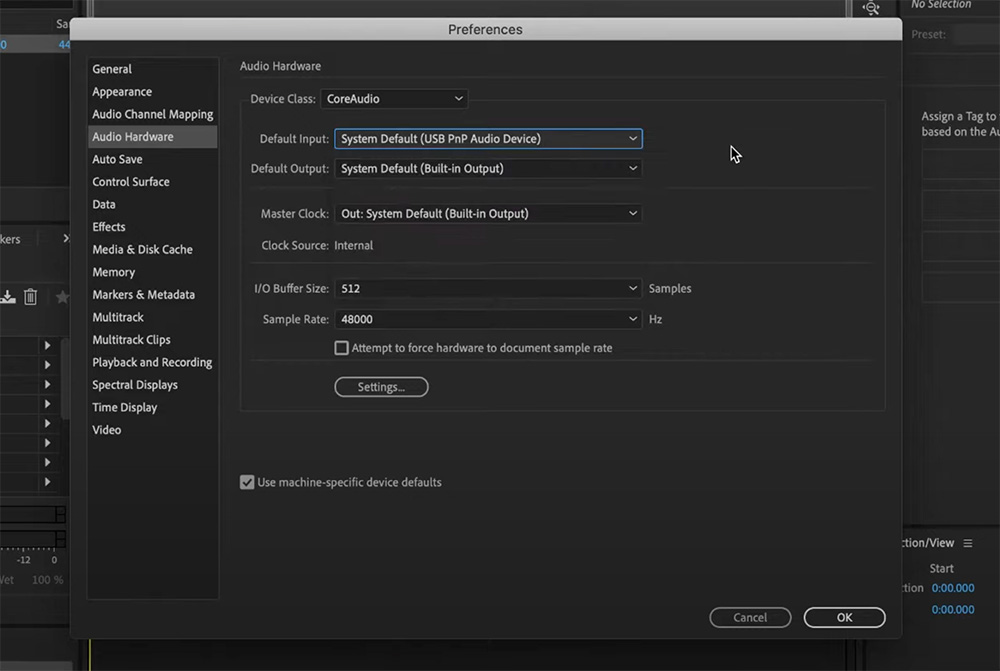
1. Go to Menu: In Adobe Audition, click on the ‘Adobe Audition’ tab in the menu.
2. Audio Hardware: Select ‘Audio Hardware’ to check your default input. Make sure it’s set to your USB microphone.
Recording the Audio
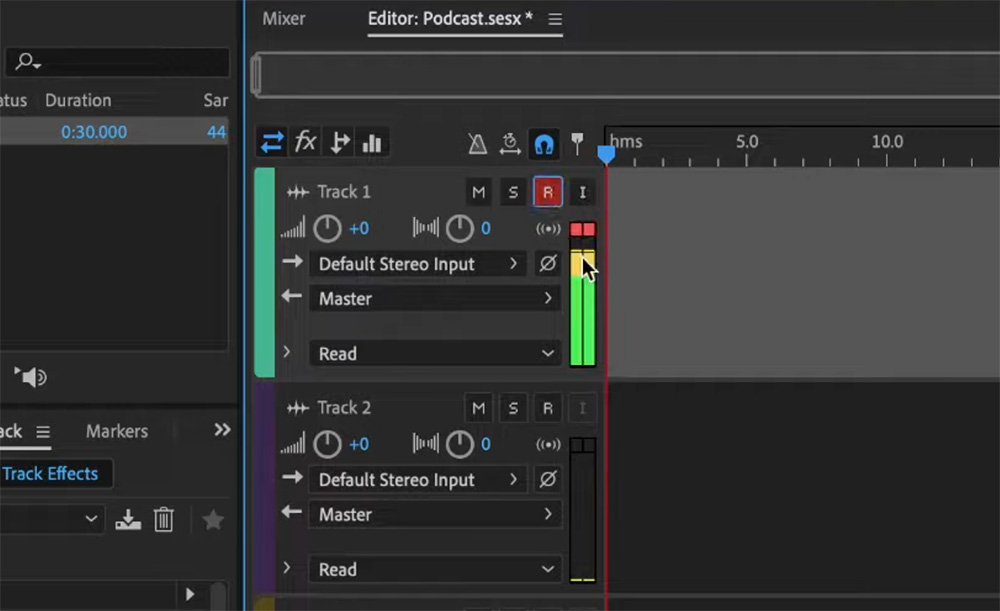
1. Enable Recording: Click on the ‘R’ icon next to your track. This prepares your track for recording.
2. Check Levels: You’ll see audio levels on the mixer. Make sure they are not peaking into the red zone.
3. Start Recording: Hit the record button (red dot at the bottom of the seassion) and start speaking into your microphone.
4. Stop Recording: To stop, you can either click the red record button again or hit the spacebar.
Playback and Review
After recording, it’s always good to play back your audio to ensure everything sounds as it should. If you’re satisfied, you’re all set! If not, you can easily re-record.
Conclusion
Recording your USB microphone directly into Adobe Audition is a straightforward process that yields high-quality audio, ready for editing. Whether you’re recording a podcast or any other audio project, this method is efficient and easy to follow.
Thank you for reading this tutorial. If you need additional help, book a consultation with me and I’ll answer all your questions!
If you want to learn everything about Podcasting in your own pace, you can become a member of my Youtube channel and access all podcasting ebooks and online courses for the price of a coffee.

Comments are closed