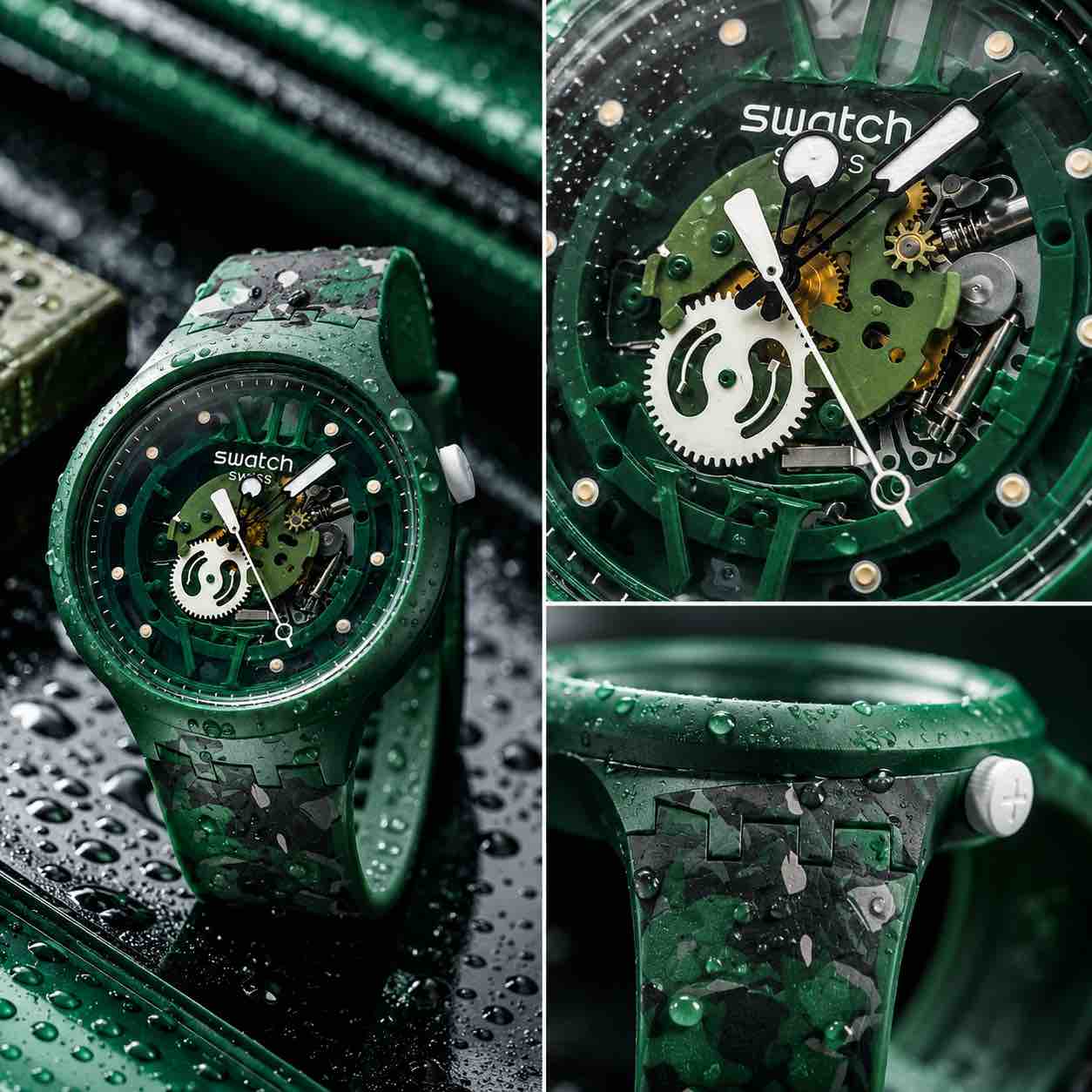
Creating Professional Product Photos Using ChatGPT took basic phone pictures of a watch with bad reflections, no proper lighting, and no studio setup.
Product photography used to be a whole production. Lights. Camera. Lens. Background. Styling. Editing. Software. Time. Budget. Someone getting emotionally attached to a shadow in the corner. And yes, if you want a proper professional campaign, all of that still matters.
But AI has changed what’s possible for quick product visuals, social media posts, Instagram content, thumbnails, and small business marketing. I tested this with a watch. Not in a studio, no proper lights and no fancy setup.
I took a few basic phone pictures near a window, uploaded them to ChatGPT, and asked it to turn them into professional-looking product images. The result honestly shocked me.
Why ChatGPT Product Photography Is So Impressive
The crazy part is not just that ChatGPT can create a nice image. It is about how bad the starting point can be.
My original photos were not perfect at all. The watch had scratches. There were reflections. The lighting was just natural light from a window. The background was basic. I didn’t set up a studio or carefully control every detail.
Normally, getting a polished product shot would mean thinking about lighting, reflections, angles, camera settings, lenses, editing, retouching, and the whole production process. With ChatGPT, the process was much faster. I uploaded the images and gave it a clear direction: make the product look professional, high-end, sporty, and suitable for Instagram.
And it worked.
Making Professional Product Photos Using ChatGPT makes this such a big deal for creators, small businesses, and anyone who needs better product visuals without spending a fortune.
What You Need to Start to Create Professional Product Photos Using ChatGPT
You don’t need much.
You need:
A product, phone with a camera, natural light, a few different photos, clear prompt = that’s it.
You don’t need a photography studio, expensive lighting or the understanding of every camera setting. You don’t even need the original photo to look amazing. You just need to give ChatGPT enough visual information to understand the product.
Taking the Original Product Photos
For my test, I used a watch. I placed it near a window where there was natural light. The setup was very simple. The product was on a basic surface, with light coming in from the window.
The background didn’t really matter because I knew ChatGPT could replace it. What mattered more was getting enough detail of the product. I took a few photos from different angles, including close-ups. This is important because close-up shots help AI understand the product better.
If the product has texture, branding, interesting details, buttons, materials, or a specific shape, show that clearly. For a watch, that means the face, strap, texture, logo, and any detail that makes it look distinctive.
The Prompt I Used
The prompt was simple.
Can you turn these images into professionally looking, high-end but also sporty product photos? Ideally for posting on Instagram.
That’s basically it. The important part is that the prompt gives ChatGPT a direction. I didn’t just say “make this better”, because that’s too vague.
I told it the style I wanted:
Professional
High-end
Sporty
Suitable for Instagram
That gives the AI a much better idea of what the final image should feel like.
Improving the First Result
The first version already looked good, but I wanted the product details to be more visible. So I asked for a change.
I told ChatGPT that I liked the style, but I wanted a bit more exposure so the details were easier to see. I also asked it to add raindrops to show that the watch was waterproof. That second version was the one that really worked.
The product looked more premium, the details were clearer, and the raindrops helped communicate one of the selling points visually. This is where ChatGPT becomes really useful. You don’t have to get the perfect image on the first attempt. You can keep adjusting it.
You can ask for:
- More exposure
- Less clutter
- A different background
- More detail
- more luxury look
- sportier style
- cleaner Instagram image
- darker campaign-style image
- square version
- YouTube thumbnail version
- website banner version
It’s like directing a product shoot, except you’re doing it through prompts.
Need Help Improving Your Content?
If your videos, photos, or social media content feel like they should be doing better, but you can’t figure out what’s wrong, I can help. With my Content Review Audit, I’ll look at your actual content and tell you what’s working, what’s not working, and what to improve.
You’ll get clear feedback, practical fixes, content ideas, strategy advice, and suggestions based on your content, not generic advice you could get from a motivational LinkedIn post. I’ll show you what to fix and why it matters.
Why This Is Useful for Creators and Small Businesses
This is huge for anyone who needs product visuals but doesn’t have the budget or time for a full shoot.
For small businesses, it can help with:
- Instagram posts
- Website images
- Blog graphics
- Launch visuals
- Social media ads
- Product mockups
- YouTube thumbnails
- TikTok visuals
- Email marketing
For creators, it can help you make simple products look more polished and more clickable.
It’s not just about making things pretty. Better visuals can make your content look more professional, which can make people take your offer, product, or brand more seriously.
What ChatGPT Can Do Well
ChatGPT can take a basic product photo and build a stronger visual around it. It can improve the background, lighting mood, styling, atmosphere, and overall presentation.
Make a product look more premium, sporty, modern, clean, dramatic, colourful, or editorial. Help you create content in different formats, which is very useful if you’re posting across different platforms.
For example, you might want:
- square image for Instagram
- vertical version for TikTok or Reels
- horizontal version for YouTube
- clean version for your website
- more dramatic version for a thumbnail
That flexibility is one of the biggest advantages.
What You Still Need to Watch Out For When Creating Professional Product Photos using ChatGPT
AI product photography is powerful, but it’s not perfect. You still need to check the final image carefully.
Sometimes AI can change details. It might alter logos, shapes, text, product features, materials, numbers, colours, or small design elements. That matters, especially if you’re selling a real product.
The final image should still represent the product honestly. You don’t want customers buying something based on an image that shows features the product doesn’t actually have.
So use AI to improve the presentation, but don’t let it misrepresent the product.
Can AI Replace a Product Photography Studio?
For some content, yes.
For high-volume social media visuals, quick product concepts, mockups, thumbnails, blog images, and basic marketing content, ChatGPT can replace a lot of the production process. That’s why it feels so insane.
Something that used to require a camera, lighting, editing, equipment, time, and a decent amount of technical knowledge can now be created from a few basic phone pictures.
But for bigger commercial shoots, full campaigns, catalogue images, and situations where every detail has to be perfectly accurate, a professional photographer or production team still has value. The difference is that now, not every piece of content needs that level of production.
And that’s a massive shift.
A Simple Workflow You Can Try
Take a few phone photos of your product near a window. Get at least one wider shot and a few close-ups. Upload the images to ChatGPT. Ask for a clear style, not just “make it better.” Review the first result.
Ask for specific changes. Check the final image for accuracy. Download the version you need for Instagram, TikTok, YouTube, your website, or your blog. That’s the whole workflow.
No studio, fancy setup and overcomplicated production day.
Final Thoughts
Creating Professional Product Photos Using ChatGPT is one of the most impressive AI uses I’ve tested. Not because it replaces every photographer or every proper shoot, but because it makes polished product visuals much more accessible.
You can take basic photos on your phone, upload them, describe the style you want, and create something that looks far more professional than the original image. For creators and small businesses, that’s a massive opportunity. It saves time, saves money, and lets you test visual ideas much faster.
And honestly, when you’ve spent years doing this the traditional way, seeing it happen in under a minute is both exciting and slightly terrifying.
Comments are closed